How it works
Two ways AI does the setup for you
Describe it
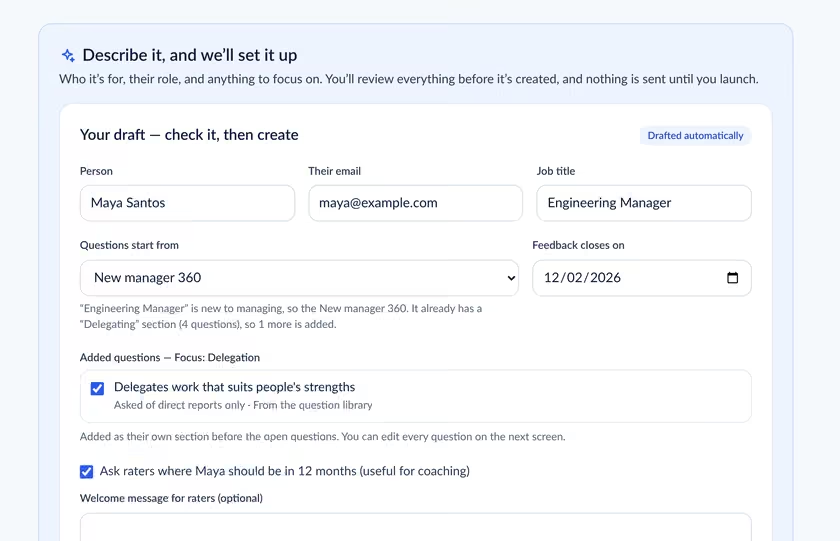
One sentence in, a ready draft out
Type who the 360 is for, their role and what to focus on. Sidelight picks the right template, adds questions for the focus area, sorts raters into manager, peers and direct reports, and suggests a closing date.
- Paste or upload a rater list (CSV or Excel), or pull it from your HR system
- Anything it had to guess is flagged so you can check it
- Raters are never told about the coach or the focus areas, so answers aren’t steered
Create with AI
A complete questionnaire in seconds
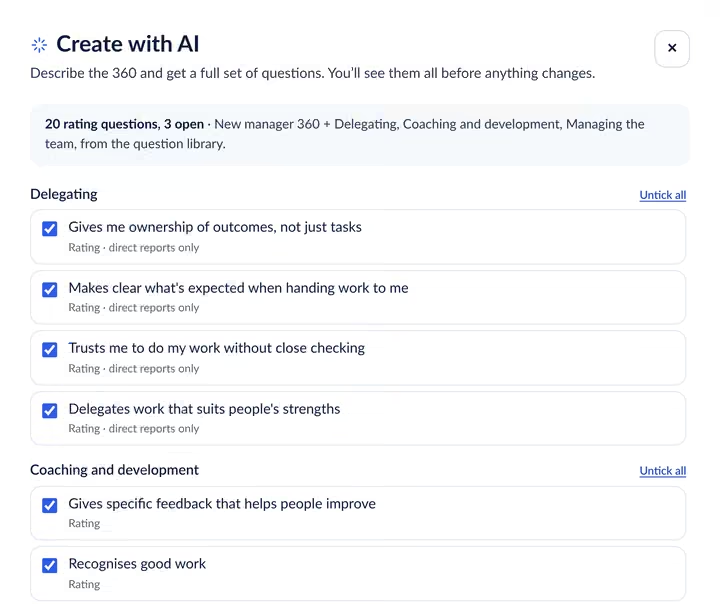
Choose who the 360 is for, add the topics that matter and pick short (about 10 ratings), standard (about 20) or detailed (about 25). Review every question with a tick, then replace your current questions or add them as new sections.
- Grouped into clear themes, with open questions at the end
- Questions only direct reports can answer are marked as such
- Self-assessment wording is written for you
Details
Built to write good 360 questions
AI that knows what makes a fair, useful 360 question.
Checked against 360 writing rules
Every question describes one behavior someone can see, starts with a verb, stays short and avoids words like “always” and “never”.
Suggest with AI
Need one more question? Ask for a suggestion in the editor and pick from options that fit the section.
Use your meeting notes
Connect Fireflies and pick up to five meetings as background for a draft. Notes are used once and never stored.
Start from a template
Prefer to pick yourself? Five tested templates and a library of 82 plain-English questions are always there.
See the time it takes
The editor shows how long the survey takes each rater as you add or remove questions.
You stay in control
AI only drafts. You review and edit everything, and nothing is sent until you click launch.
Run your first 360 free
Join early access and we’ll set you up with your first 360 at no cost.